Introduction
Neutron UI is
is a Component Library made with a goal of saving time to
develop
apps spending less time on styling css and focus more on your app's functionality
the library currently features one breakpoint at 600px Although every component is already
tested at differnet viewports and made completly reponsive
You can simply add this Library by adding the given link in your HTML file
Alerts
Alerts can be usefull for making the user aware of sudden change in the app like added the items in cart or the transaction failed
Avatar
Avatars are now required in almost every app these days ,we have three types of avatars based on the sizes

Buttons
Buttons ,Well a website Could'nt exist without buttons ,In this
Library I
Have tried to make them simple yet noticeable.
There are two kinds of buttons in this Library as you might have guessed
button-primary
and button-secondary also these classes can be applied to anchor
tags aswell
buttons tags with class:
Cards
Cards are a crucial design element to show data to users without
scaring them with a homework to read large paragraphs
Currently we have three card options card-h for horizontally stacked content
card-vfor vertically arranged contenyt and card-h-cx which is a
horizontal card with button top close it at the corner anchor
tags aswell
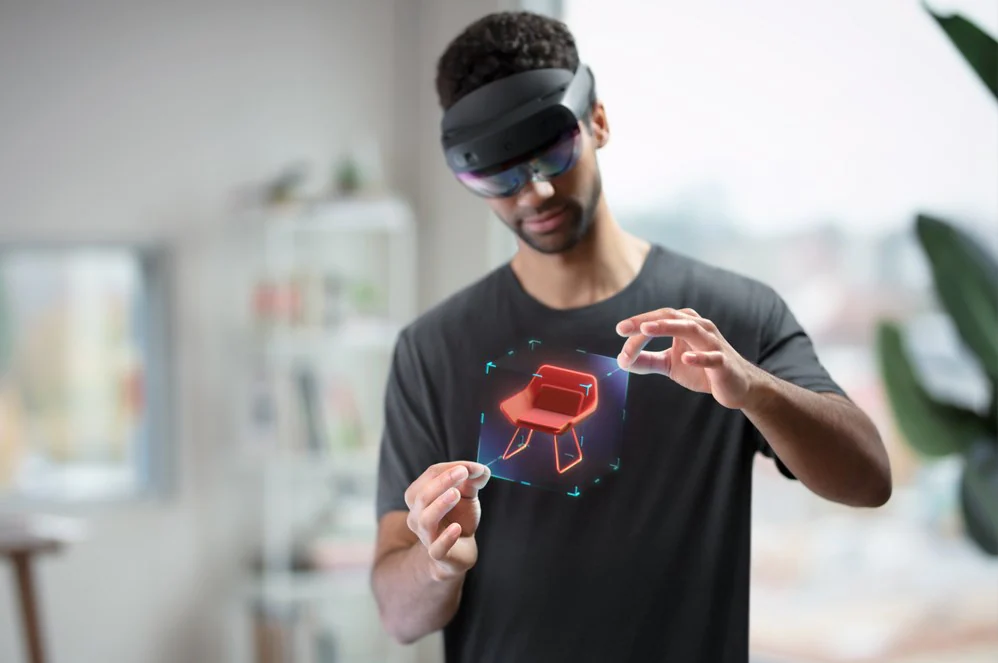
Hola lens 2
Introduce new ways for your workforce to solve problems, design and review spaces, learn complex processes, and help customers buy the right prdouct right where they are in the field
Hola lens 2
Introduce new ways for your workforce to solve problems, design and review spaces, learn complex processes, and help customers buy the right prdouct right where they are in the field
Lists
This library consists of two kinds of lists-
list-stacked and list-tag
these can be used in multiple ways in your page ,could pass links,buttons or notifications
as list items
List stacked:
-
You have 6 new messages
-
Tanay pratap has started following you
-
You have 6 new messages
List Tag:
Modal
Modal ,Ohh we all need them in tons of places from showing an
awesome
offer card on your E-commerce app to an Email collection form for a newsletter.
In this library you can use modal boxes without any javascript all you need is
anchor tag directed to the id of the respective box
the box also has a close button by default to make sure that user gets back to the same
place from where the box was triggered you can pass the id of initial anchor
Input
We need to take a lot of text Inputs from users to offer a great
user experience in return
You can get a beautifull input field by just adding input-primary class in
input
we Currently have two types of input fields text and "search" more
comming soon :)
the shadow here is a Utility class ,can be removed or added anytime as per your design
Utilities
Although there are lot of components available in this library and
will increasing in future
there are certain situations where you just want to add a single or few specific properties
to a vanilla div
keeping that in mind I have added a bunch of Utilities in this Library
A detailed overview of them is given below.
- d-flex : makes a normal flex
- d-flex-v:adds a box with direction as row
- justify-content-center:added with flex
Paragraph
Add some styling to your paragraph using paragraph-primary this
changes font family to primary and size to 18px example the intro paragraph
Text center
As the name says it will add css property textalign:center
Text Link
Many times we want to make a piece of text as link but the raw anchor tag
ruins it
use this text-link class to instanlty make example text clickable
Colors
Who doesnt likes colors on a website ,well you can add them anywhere just by css classes and the default pressets just add the color variable names class or add bg before to make it background color
Shadows
Shadows are really trendy in modern UI designs ,you can add them by using css
classes ,currently there are two presets available for shadows -
shadow-light and shadow-normal this card is an
example of shadow-light
Container
Container class is available in the component library start as big wrap for all your components this adds margin of 2rem from both left and right side so your content doesnt gets sticked edge to edge.
Flexbox
Flexboxes are amazing for keeping the sites responsive and you will probably
need them a lot if making something
without our components ,we got you covered!. Just add the Css class
d-flex whenever you need one
there are multiple varients available for flex and adding flex properties
you probably are familiar with
Padding
You can add paddings anywhere just by adding a css class: p, px or py these
specify paddings on both ,horizontal(x-axis) or vertical( y-axis)
respectively
Now these classes add padding equally on both or all sides the
used class, the magnitude of them can be declared by adding a value between
1-6 seperated by hyphen (-), the values 1-6 are in REM unit so a px-5 class
adds horizontal padding of 5rem from both sides
Margin
You can add MArgings anywhere just like padding by adding a css class: m, mx
or my these
specify margins on both ,horizontal(x-axis) or vertical( y-axis)
respectively
Now these classes add margins equally on both or all sides the
used class, the magnitude of them can be declared by adding a value between
1-6 seperated by hyphen (-), the values 1-6 are in REM unit so a px-5 class
adds horizontal margins of 5rem from both sides